盒子模型
display
display 属性
- 控制元素显示类型;
- outside: 外部布局角色;
- inside: 内部布局模式;
- outside + inside: 同时声明外部和内部显示类型;
/* 外部属性 */
span {
  display: block;
}

/* 内部属性 */
span {
  display: flex;
}

/* 外部属性 + 内部属性 */
span {
  display: block flex;
}
外部属性
- 元素参与外部布局的显示角色;
span {
  /* 块级标签样式 */
  display: block;
  /* 内联标签样式 */
  display: inline;
}
内部属性
- 元素内部子元素的布局模式;
span {
  /* 块级上下文 */
  display: flow-root;
  /* flex 布局 */
  display: flex;
  /* grid 布局 */
  display: grid;
}
块级盒子
块状盒子
特性
- 不同块级标签之间换行;
- 具有 width/height 属性;
- padding/margin/border 会推开其他元素;
- inline 方向默认扩展并填满可用空间;
常见块级标签
- hx;
- p;
- div;
- ul;
- ol;
- dl/dt/dd;
标准盒子模型
组成
- content box;
- padding box;
- border box;
- margin box;

宽度/高度机制
- height/width 默认仅作用于 content box;
- content box + padding box + border box;

替代盒子模型
替代盒子模型
- 盒子高度宽度包括 padding box 和 border box;
box {
  box-sizing: border-box;
}

全局设置替代盒子模型
:root {
  box-sizing: border-box;
}
*,
::before,
::after {
  box-sizing: inherit;
}
内联盒子
内联盒子
特性
- 不同标签之间不自动换行;
- width/height 属性无效;
- padding/margin/border 水平方向会造成其他元素推出盒子, 竖直方向无效;
常见行内标签
- a;
- span;
- strong;
- em;
- u;
内联块级盒子
- 不同标签不自动换行;
- width/height 属性有效;
- padding/margin/border 会造成其他元素推出盒子;
span {
  display: inline-block;
}
/* inline-block equivalent to inline flow-root */
span {
  display: inline flow-root;
}
替换元素
基础
替换元素
- CSS 控制外部尺寸和位置;
- CSS 不控制内部内容布局;
常见替换元素
- 图片相关标签;
- 视频相关标签;
调整图像大小
- max-height/max-width: 限制最大尺寸;
- object-fit: 控制内容适配方式;
拉伸机制
- 替换元素默认不拉伸;
- width/height 可强制拉伸;
img {
  width: 100%;
  height: 100%;
}
object-fit 属性
- 设置替换元素显示方式;
fill {
  /* 原始尺寸 */
  object-fit: none;
  /* 保留纵横比, 尽可能放大, 保留空白 */
  object-fit: contain;
  /* 保留纵横比, 填满容器, 多余部分裁剪 */
  object-fit: cover;
  /* 不保留横纵比, 填满容器 */
  object-fit: fill;
  /* 取 none 和 contain 中的小尺寸 */
  object-fit: scale-down;
}
盒子模型属性
width/height 属性
width 属性
- width: 设置 content box inline size;
table {
  width: auto;
  width: 75%;
  width: 100px;
}
max-width 属性
- max-width: 限制最大 inline size;
table {
  max-width: none;
  max-width: 75%;
  max-width: 100px;
}
其余属性
- min-width 属性;
- min-height 属性;
- max-height 属性;
百分比
- width/height 百分比基于 containing block 计算;
padding 属性
padding 属性
h3 {
  background-color: cyan;
  padding: 110px 50px 50px 110px;
}
成分属性
- padding-bottom;
- padding-left;
- padding-right;
- padding-top;
多值语法格式
- 1 value: 四个边;
- 2 value: 竖直 + 水平;
- 3 value: top + 水平 + bottom;
- 4 value: top + right + bottom + left;
属性值百分比机制
- padding 百分比以父容器 inline size 为基准;
border 属性
border 属性
div {
  border: 0rem outset pink;
}
成分属性
- border-color 属性;
- border-style 属性;
- border-width 属性;
简写属性规则
/* style */
/* color | style */
/* style | width */
/* color | style | width */
border-color 属性
- border-bottom-color 属性;
- border-left-color 属性;
- border-right-color 属性;
- border-top-color 属性;
border-style 属性
- border-bottom-style 属性;
- border-left-style 属性;
- border-right-style 属性;
- border-top-style 属性;
b1 {
  border-style: none;
  border-style: hidden;
  border-style: dotted;
  border-style: dashed;
  border-style: solid;
  border-style: double;
}
border-width 属性
- border-bottom-width 属性;
- border-left-width 属性;
- border-right-width 属性;
- border-top-width 属性;
margin 属性
基本概念
- 属性值、多值属性、百分比机制同 padding;
margin collapsing
- 普通流中 block-level box 的相邻 block-axis margin 合并为单个 margin;
- 常见场景: 相邻兄弟块、父子块、空块自身上下 margin;
- 两个正数: 取最大值;
- 两个负数: 取最小值;
- 一正一负: 两者相加;
overflow 属性
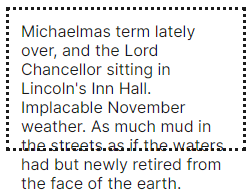
溢出问题
- content box 容纳不足时产生 overflow;
overflow 属性
- 控制盒子溢出内容的裁剪和滚动行为;
p {
  /* 不裁剪 */
  overflow: visible;
  /* 裁剪, 无滚动条, 可通过 js 滚动 */
  overflow: hidden;
  /* 裁剪, 无滚动条, 不可通过 js 滚动 */
  overflow: clip;
  /* 裁剪, 始终显示滚动条 */
  overflow: scroll;
  /* 裁剪, 按需显示滚动条 */
  overflow: auto;
}
成分属性
- overflow-x;
- overflow-y;
多值属性
- 1 value;
- 2 value: x + y;
outline 属性
outline 属性
- 生成轮廓线;
- 位于 border 外侧;
- 语法类似 border 属性;
a:focus {
  outline: 4px dotted #e73;
  outline-offset: 4px;
}
outline-offset 属性
- outline 偏移量;
- 向外为正方向;
a:focus {
  outline: 4px dotted #e73;
  outline-offset: 4px;
}
border-radius 属性
border-radius 属性
- 设置 border/outline 圆角;
div {
  border-radius: 10px 100px / 120px;
}
成分属性
- border-top-left-radius;
- border-top-right-radius;
- border-bottom-right-radius;
- border-bottom-left-radius;
多值语法
- 单参数;
- 1 value: 四角;
- 2 value: 左上-右下 + 右上-左下;
- 3 value: 左上 + 右上-左下 + 右下;
- 4 value: 左上 + 右上 + 右下 + 左下;
- 双参数;
- / 分割;
- / 前后的两个参数分别表示圆角椭圆的两个半径;
- 前后两个参数分别按照单参数的机制;
box-shadow
- 设置盒子模型阴影;
offset-x | offset-y | color;offset-x | offset-y | blur | color;offset-x | offset-y | blur | spread | color;- blur 为阴影模糊半径;
- spread 为阴影整体缩放;
- 可叠加;
/* Keyword values */
box-shadow: none;
/* A color and two length values */
/* <color> | <length> | <length> */
box-shadow: red 60px -16px;
/* Three length values and a color */
/* <length> | <length> | <length> | <color> */
box-shadow: 10px 5px 5px black;
/* Four length values and a color */
/* <length> | <length> | <length> | <length> | <color> */
box-shadow: 2px 2px 2px 1px rgb(0 0 0 / 20%);
box-shadow:
  3px 3px red inset,
  -1em 0 0.4em olive;
aspect-ratio 属性
- 定义盒子的固定宽高比;
/* width / height */
aspect-ratio: 1 / 1;
/* 省略 height, 默认为 1 */
aspect-ratio: 1;

/* 替换元素使用自身长宽比, 其余元素无固定长宽比 */
aspect-ratio: auto;

/* 若是替换元素, 使用 auto, 反之使用 width / height */
aspect-ratio: auto 3/4;
aspect-ratio: 9/6 auto;
最佳实践
对齐
左右对齐
使用 margin 实现左右对齐
.right {
  width: 200px;
  /* 自动右对齐 */
  margin-left: auto;
}
.left {
  width: 200px;
  /* 自动左对齐 */
  margin-right: auto;
}
居中
flex 布局
.container {
  display: flex;
  align-items: center;
  justify-content: center;
}
文本
.container {
  height: 100px;
  line-height: 100px;
  text-align: center;
}
table 布局
- 不推荐使用;
.wrapper {
  display: table;
}
.container {
  display: table-cell;
  vertical-align: middle;
  text-align: center;
}
绝对定位 + margin
- 父元素: relative 定位;
- 居中元素: absolute 定位;
- 四个属性均设置为 0;
- margin: auto;
.father {
  width: 500px;
  height: 300px;
  border: 1px solid #0a3b98;
  position: relative;
}
.son {
  width: 100px;
  height: 40px;
  background: #f0a238;
  position: absolute;
  top: 0;
  left: 0;
  right: 0;
  bottom: 0;
  margin: auto;
}
绝对定位 + 负边距
- 父元素: relative 定位;
- 居中元素: absolute 定位;
- 使用 top 和 left 定位;
- 设置确定的 width/height;
- margin-top/margin-left: 宽高的一半负值;
.container {
  position: relative;
}
.child {
  position: absolute;
  top: 50%;
  left: 50%;
  width: 200px;
  height: 200px;
  margin: -100px 0 0 -100px;
}
画画
一条 0.5px 的线
- transform: 将 1px 线条缩小一半;
hr {height: 1px;border: none;background-color: black;transform: scaleY(0.5);}
- 伪元素 + box-shadow: 模拟 0.5px 线条;
hr {height: 1px;border: none;position: relative;}hr::after {content: "";display: block;position: absolute;top: 0;left: 0;width: 100%;height: 1px;box-shadow: 0 0.25px 0.25px rgba(0, 0, 0, 0.5);}
三角形
- border: 四条边框在转角处以斜线相接, 每条边框不是完整矩形, 而是梯形区域;
- content 趋近 0 时, border 拼成三角形;
div {
  width: 0;
  height: 0;
  border: 100px solid transparent;
  border-bottom-color: red;
}
扇形
div {
  border: 100px solid transparent;
  width: 0;
  height: 0;
  border-radius: 100px;
  border-top-color: red;
}