样式与尺寸
如何读写元素样式?
const myDiv = document.getElementById("myDiv");
myDiv.style.backgroundColor = "red"; // 单个属性用驼峰
myDiv.style.cssText = "width: 25px; height: 100px"; // 批量设置
myDiv.style.getPropertyValue("height"); // 读取
myDiv.style.removeProperty("border"); // 移除
for (let i = 0; i < myDiv.style.length; i++) console.log(myDiv.style[i]); // 迭代
- 读取口径:
element.style只包含行内样式, 最终生效值要用getComputedStyle;
如何操作样式表与计算样式?
document.styleSheets[0].cssRules; // 规则集合
const rule = document.styleSheets[0].cssRules[0];
rule.selectorText; // 规则的选择符
rule.style; // CSSStyleDeclaration
document.styleSheets[0].insertRule("body { margin: 0 }", 0); // 插入规则
document.styleSheets[0].deleteRule(0); // 删除规则

const style = window.getComputedStyle(box, "after"); // 指定伪元素可选
style.getPropertyValue("height");
getComputedStyle: 返回元素最终生效的 CSSStyleDeclaration, 只读;
三类尺寸分别表示什么?
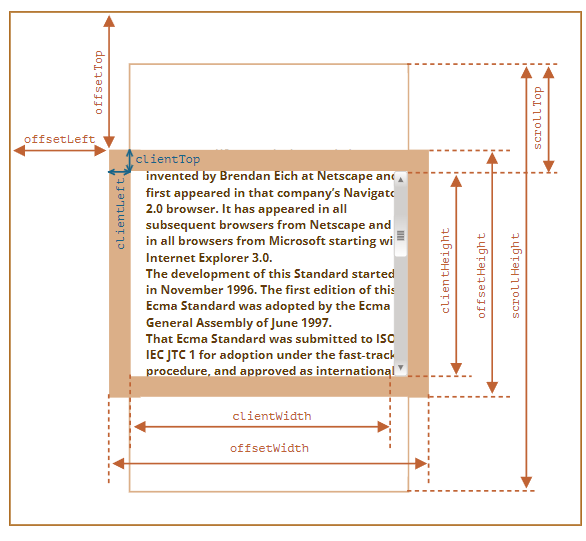
| 类别 | 组成 | 含义 |
|---|---|---|
| 偏移尺寸 | content + padding + border | 元素占用的视觉空间, 如 offsetWidth |
| 客户端尺寸 | content + padding | 元素可见内容空间, 如 clientWidth |
| 滚动尺寸 | 总内容 (含不可见部分) | 内容整体尺寸, 如 scrollWidth |
- 偏移量:
offsetLeft/offsetTop相对偏移父级,clientLeft/clientTop为边框宽度,scrollLeft/scrollTop为滚动偏移;
// 无滚动条时: scrollWidth === clientWidth
// 有滚动条时: scrollLeft + clientWidth === scrollWidth
getBoundingClientRect 返回什么?
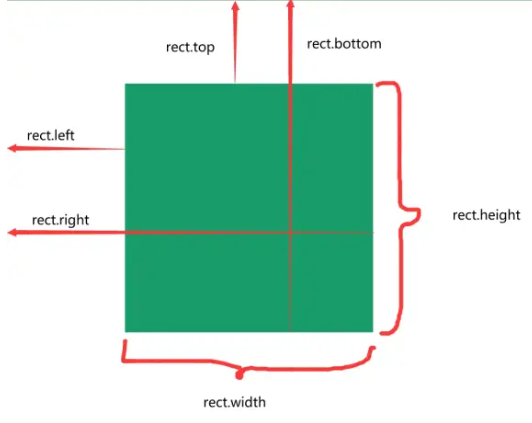
| 属性 | 含义 |
|---|---|
x / y | 左 / 上边界相对视口坐标 |
width / height | 元素宽高 |
top / right / bottom / left | 四边相对视口的距离 |
const rect = box.getBoundingClientRect();