层叠与优先级
层叠是什么?
- 层叠: CSS 规则冲突时的取值机制;
- 目标: 从多条候选声明中选出唯一生效值;
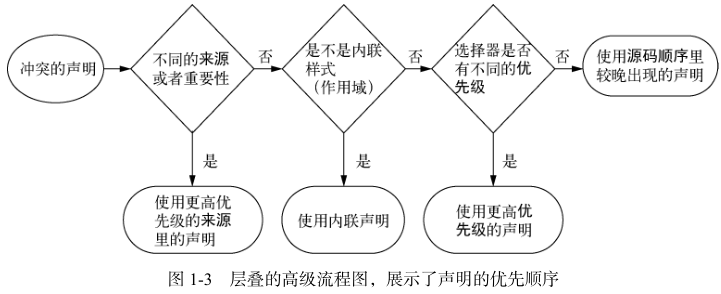
层叠按什么顺序决定取值?
- 逐步排序: 前一步相同才进入下一步;
- relevance → origin/importance → cascade layer → specificity → scoping proximity → source order;
- relevance: 只保留当前环境匹配的声明;
- media query 匹配;
- supports query 匹配;
origin 与 importance 如何排序?
- origin: 声明的来源;
- user-agent: 浏览器默认样式;
- user: 用户自定义样式;
- author: 页面作者样式;
- importance: 是否带
!important; !important: 把声明提升到对应 origin 的 important 层;
| 优先级 | 来源 |
|---|---|
| 低 | user-agent normal |
| user normal | |
| author normal | |
| keyframes animation | |
| author !important | |
| user !important | |
| user-agent !important | |
| 高 | transition |
cascade layer 如何改变普通声明的优先?
- 前提: origin 与 importance 相同;
- normal 声明: 未分层声明优先于分层声明;
- normal 声明: 后声明的 layer 优先于先声明的 layer;
- important 声明: 规则反转, 分层优先于未分层, 先声明优先于后声明;
@layer base, components;

@layer components {
  button {
    color: blue;
  }
}
选择器优先级如何计算?
- 三列计数: Identifiers + Classes + Elements;
- Identifiers: ID 选择器;
- Classes: 类、属性、伪类选择器;
- Elements: 元素、伪元素选择器;
- 比较: 三列数值依次比较, 越大优先级越高;
- inline style: 优先级高于普通选择器;
| 选择器 | Identifiers | Classes | Elements | 特殊性 |
|---|---|---|---|---|
| h1 | 0 | 0 | 1 | 001 |
| p.class | 0 | 1 | 0 | 010 |
| h1 + p[class] | 0 | 1 | 1 | 011 |
| #id | 1 | 0 | 0 | 100 |
scoping proximity 与 source order 何时生效?
- scoping proximity:
@scope中作用域根更近的声明优先; - 生效前提: origin/importance、layer、specificity 均相同;
- source order: 前面全部相同, 后声明覆盖先声明;
@scope (.card) {
  p {
    color: red;
  }
}