层叠, 优先级和继承
层叠
基础
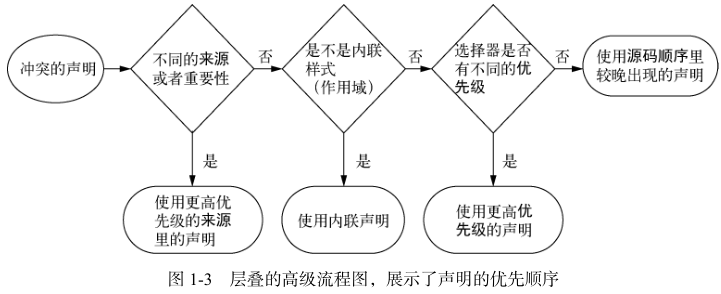
层叠
- css 规则发生冲突时;
- 如何解决冲突;
机制
- 样式表的来源;
- 选择器优先级;
- 源码顺序;
样式表的来源
样式表种类
- 浏览器默认 style sheet;
- 用户 style sheet;
- 第三方 style sheet;
- 第三方 style sheet 中的 !important 声明;
- 用户 style sheet 中的 !important 声明;
- 浏览器默认 style sheet 中的 !important 声明;
!important
- 无视特殊性和优先级;
- 强行将 !important 对应的样式;
- 设置为标签样式;
#winning {
  background-color: red;
  border: 1px solid black;
}

.better {
  background-color: gray;
  border: none !important;
}
优先级
选择器优先级
- Identifiers + Classes + Elements;
- Identifiers: ID 选择器;
- Classes: 类选择器, 属性选择器, 伪类;
- Element: 元素选择器, 伪元素选择器;
- 越大优先级越高;
| 选择器 | Identifiers | Classes | Elements | 特殊性 |
|---|---|---|---|---|
| h1 | 0 | 0 | 1 | 001 |
| p.class | 0 | 1 | 0 | 010 |
| h1 + p[class] | 0 | 1 | 1 | 011 |
| #id | 1 | 0 | 0 | 100 |
经验法则
经验法则
- 不要使用 id;
- 不要使用 !important;
继承
基础
继承
- 子标签继承父标签的属性;
可继承属性和不可继承属性
- 可继承属性: 样式;
- font 相关;
- color 相关;
- text 相关;
- list 相关;
- 不可继承属性: 布局, 尺寸;
- 盒子模型相关;
- position 相关;
- float 相关;
- display 相关;
特殊值
inherit
- 表明子标签使用父标签对应样式
#sidebar h2 {
  color: inherit;
}
initial
- 表明子标签使用浏览器默认值;
#sidebar h2 {
  color: initial;
}
其他属性
- unset;
- revert;
- all;
简写属性
简写属性
- 同时给多个属性复制的属性;
font: italic bold 18px/1.2 "Helvetica", "Arial", sans-serif;
简写属性会默默覆盖其他样式
- 简写属性隐式设置省略值;
- 可能覆盖其他样式定义的值;
理解简写属性的顺序
- 简写属性尽量无视顺序;
- 上下左右;
- 1: 全部;
- 2: 上下, 左右;
- 3: 上, 左右, 下;
- 4: 上, 下, 左, 右;
- 水平竖直: 水平, 竖直;