DOM 性能实践
如何判断元素是否在可视区域?
getBoundingClientRect方案: 比较元素四边与window.innerHeight/innerWidth;IntersectionObserver方案: 直接读取交叉状态;
| 判定 | getBoundingClientRect 口径 | IntersectionObserver 口径 |
|---|---|---|
| 部分包含 | top > 0 && top < innerHeight, left 同理 | intersectionRatio 在 (0, 1) |
| 完全包含 | top > 0 && bottom < innerHeight, 左右同理 | intersectionRatio === 1 |
上拉加载与下拉刷新如何实现?
- 上拉加载: 触底时加载下一页;
if (scrollTop + clientHeight >= scrollHeight - distance) {
  // 触发加载
}
- 下拉刷新: 监听
touchstart/touchmove/touchend, 用translateY跟随下拉, 松手后触发刷新并复位;
大数据量列表如何渲染?
| 方案 | 要点 |
|---|---|
| 直接渲染 | 数据量大时不可取 |
setTimeout 分页渲染 | 按页拆分, 逐页渲染, 减少单帧压力 |
requestAnimationFrame | 用 RAF 替代定时器, 与刷新率对齐 |
| 文档碎片 + RAF | 先在内存中构建 DocumentFragment, 再一次性插入, 减少重排重绘 |
| 懒加载 | 页尾放空节点, 用 getBoundingClientRect 或 IntersectionObserver 观察, 进入视口再渲染下一页 |
| 虚拟列表 | 见下 |
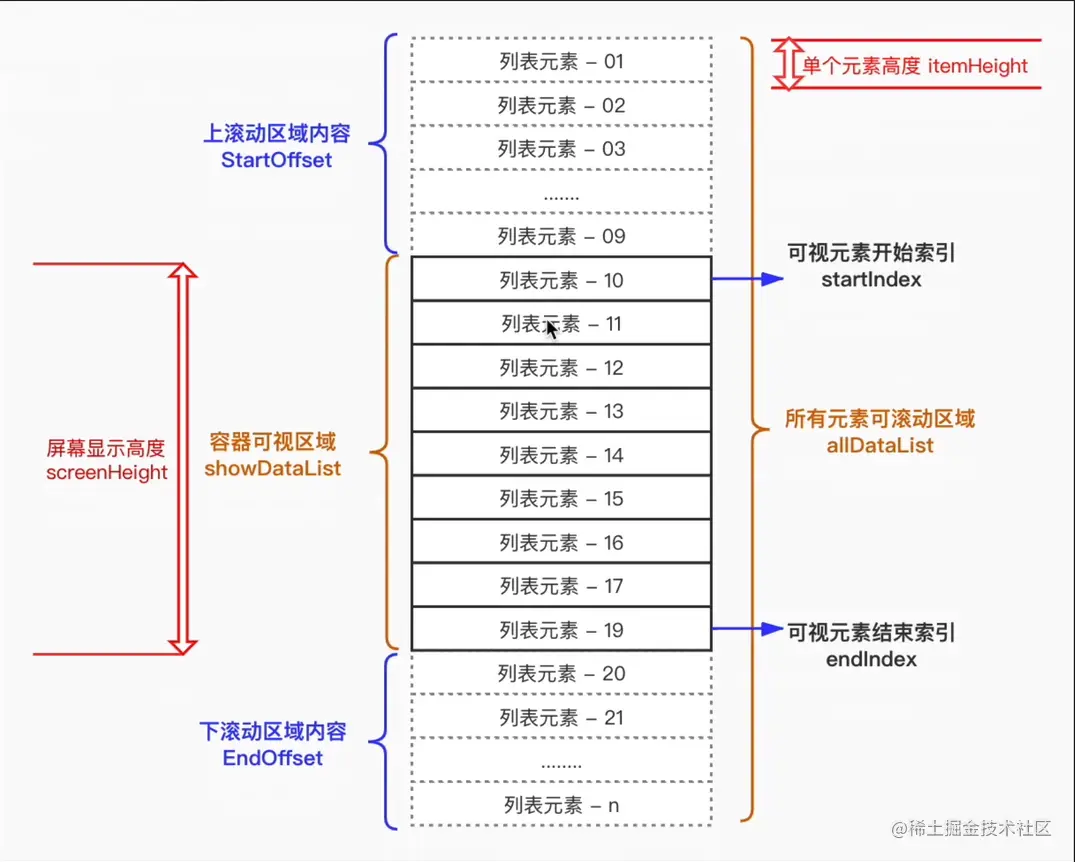
虚拟列表的实现机制是什么?
- 固定可视区高度
showHeight与列表项高度itemHeight; - 由滚动位置计算渲染区间, 并预留缓存项避免滑动卡顿;
start = Math.floor(scrollTop / itemHeight) - buffer;end = start + Math.ceil(showHeight / itemHeight) + buffer;
- 监听滚动, 只渲染
start到end的列表项, 用绝对定位把首项放到startIndex * itemHeight的位置; - 滚动回调使用节流, 避免高频渲染;